


Bitcoin remains one of the most popular cryptocurrencies, and Cash App offers a simple way to purchase it.
As of 2026, Cash App continues to support Bitcoin purchases exclusively for U.S. users.
Unlike most crypto platforms, Cash App continues to focus exclusively on Bitcoin. In 2026, the Bitcoin-only approach of Cash App reduces regulatory risk, simplifies compliance, and allows Block Inc. to optimize Lightning payments, custody, and transfers without supporting volatile altcoins.
Learning how to buy Bitcoin on Cash App is straightforward with just a few steps. This guide breaks down the process so you can begin without complications.
Cash App is best for:
- U.S. users buying small to medium amounts of Bitcoin
- Lightning payments and instant transfers
- Beginners who want simple BTC exposure
Cash App is not ideal for:
- High-volume traders
- Users seeking low fees
- Users who needs advanced trading tools
Here’s how to get started:
- Step 1 – Sign up on Cash App or log in
- Step 2 – Select the money tab
- Step 3 – Select “Buy Bitcoin”
- Step 4 – Set the amount and review the fees
- Step 5 – Enter PIN and finalize
- Step 6 – Send your crypto to a wallet or keep it on Cash App
How to Buy Bitcoin Directly on Cash App in 2026
Once you know how to buy Bitcoin on Cash App, managing your crypto becomes effortless.
In this section, we’ll explain the steps in detail to help you purchase Bitcoin directly on Cash App.
Step 1 – Sign up on Cash App or Log in
If you do not have Cash App yet, download it from the App Store if you are using an iPhone or Google Play if you have an Android device.
After installing the app, open it and create an account by entering your phone number or email.
You will receive a confirmation code that you must enter to verify your identity. Cash App now requires additional selfie verification when you enable Bitcoin features.
Once verification is complete, link a bank account to fund your Bitcoin purchase. Credit cards remain unsupported for crypto buys, but you can link a debit card or bank account.
If you’re looking for alternative payment methods, you can alsobuy Bitcoin with PayPal or use a debit card to purchase crypto on various platforms before transferring it to Cash App.
If you already have Cash App, log in using your credentials. This is the first step in how to buy Bitcoin on Cash App for the first time.
Cash App simplifies the process by guiding you through each step and making sure your payment method is ready for transactions.
Once your account is set up, you can proceed to buy Bitcoin with just a few taps.
Step 2 – Select the Money Tab
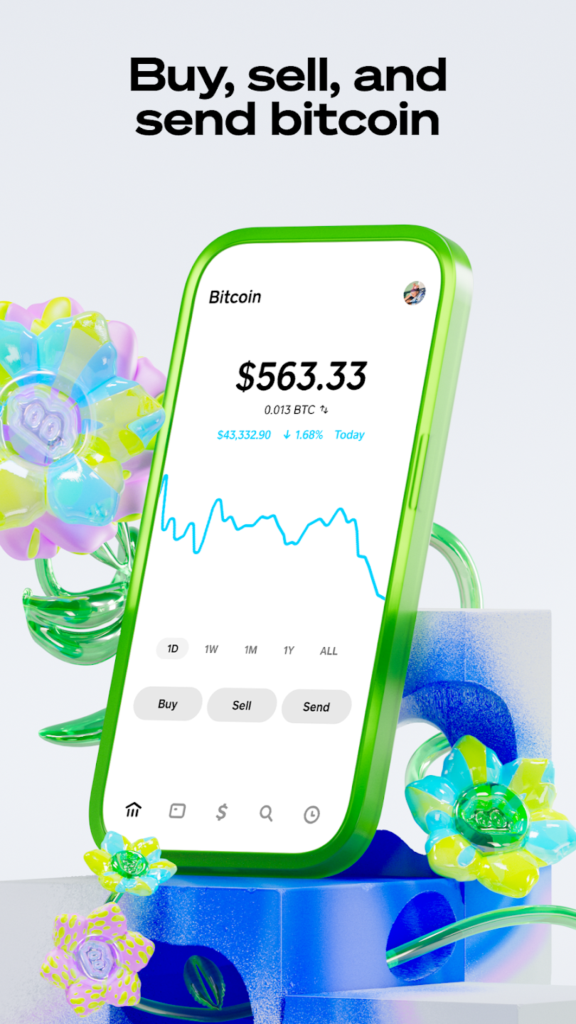
After logging in, go to the Money tab. You will find it at the bottom of the screen, represented by a bank icon with a dollar symbol. This section displays your Cash App balance and provides access to financial tools.
In newer versions, some users may see a dedicated “Bitcoin” ₿ tab instead of only the Money tab.
The Money tab allows you to add funds, check your Bitcoin holdings, and manage your account.
If your account is new, you need to add money from your linked bank account before proceeding. Adding funds in advance makes your Bitcoin purchase smoother.
Once you are in the Money tab, you are ready to buy Bitcoin.
Step 3 – Select “Buy Bitcoin”
From the Money tab, scroll down until you see the Bitcoin section.
Tap on “Buy Bitcoin” to start the purchase process. Then, the app will take you to a screen where you can enter the amount of Bitcoin you want to purchase.
If you are new to Bitcoin, you do not need to buy an entire coin. You can purchase as little as a few dollars’ worth of Bitcoin, which makes it easy to start with a small investment and increase your holdings over time. You can purchase as little as a few dollars’ worth of Bitcoin, starting from just $1 as of 2026.
Before continuing, check that you are comfortable with the amount you are about to buy.
Step 4 – Set the Amount and Review the Fees
Now enter the amount of Bitcoin you want to buy.
You can type in a specific dollar amount such as $10, $50, or $100 instead of purchasing a full Bitcoin. Cash App will automatically convert the amount into Bitcoin based on the current exchange rate.
Before finalizing your purchase, Cash App will display any applicable fees. Cash App now shows both a fixed service fee and a variable market-based spread that adjusts with liquidity
The app charges a small fee for buying Bitcoin, and this fee varies based on market conditions. You will see a breakdown of the total cost, including the fee, before confirming the transaction.
Take a moment to review all the details on the screen. If the price and fees look acceptable to you, proceed to the next step.
Step 5 – Enter PIN and Finalize
To complete your Bitcoin purchase, confirm the transaction by entering your Cash App PIN or using Face ID or fingerprint authentication if enabled.
This adds an extra layer of security and makes sure that only you can approve purchases from your account.
After entering your PIN, tap “Confirm” to complete the purchase.
The app will process the transaction, and within a few seconds, the Bitcoin will be added to your Cash App balance.
You’ll receive an on-screen confirmation, and your new BTC balance will reflect in real time.
That’s it! You have successfully bought Bitcoin using Cash App.
Step 6 – Send Your Crypto to a Wallet or Keep it on Cash App
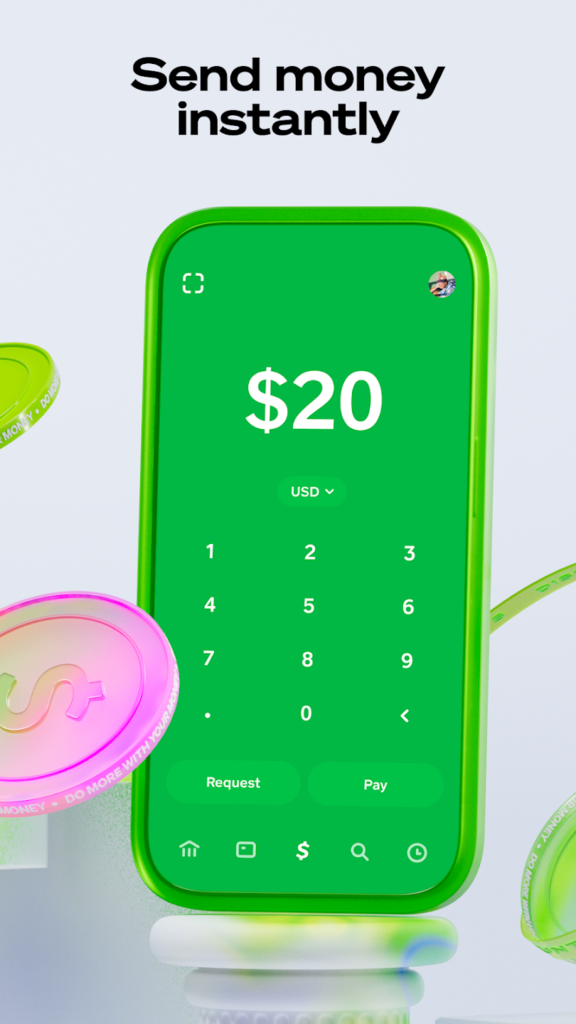
Once the Bitcoin purchase is complete, there are two options available.
- Keep the Bitcoin on Cash App—storing BTC within the app allows quick transactions and makes selling faster whenever needed.
- Transfer the Bitcoin to another wallet—crypto wallets, such as a hardware wallet or another exchange, provide more control over the assets.
In 2026, Lightning Network withdrawals are now the default method on Cash App, with on-chain transfers primarily used for large or custodial-to-custodial transactions.
Cash App provides flexibility in managing Bitcoin. Keeping it within the app offers convenience, while transferring it to a private wallet enhances security.
Buying Bitcoin With Cash App on Exchanges
If you don’t want to buy Bitcoin directly on Cash App, you can purchase it on a cryptocurrency exchange and transfer it to your Cash App wallet. This gives you access to more trading options, lower fees, and different payment methods.
However, you can only send Bitcoin into Cash App wallets from supported Bitcoin networks (on-chain or Lightning), not from unsupported altcoin networks.
Here are some popular exchanges where you can buy Bitcoin and send it to Cash App:
Best Exchanges for Buying Bitcoin in 2026 Listed
-
 Coins
Coins



-
-

-
 PromotionsCoins

-
 Coins
Coins


Best Exchanges for Buying Bitcoin in 2026 Reviewed

Get $10 in Bitcoin when you register through a referral link from an existing member.


Kraken, founded in 2011, has established itself as one of the best crypto exchanges in the USA, offering a comprehensive platform for both novice and experienced traders. Supporting over 200 cryptocurrencies and advanced features like margin and futures trading, Kraken caters to diverse investor needs. Recognized for its robust security measures and regulatory compliance, Kraken has never suffered a major hack. The exchange provides competitive fees, a user-friendly interface, and 24/7 customer support. While facing recent SEC challenges, Kraken continues to innovate, introducing an NFT marketplace and expanding its institutional services. Despite strong competition, Kraken remains among the best crypto exchanges in the USA, balancing accessibility with advanced trading options.
- Supports hundreds of coins
- High liquidity
- Simple and user-friendly interface
- Good customer support options
- Lots of advanced trading features like margin, futures, and indices trading
- No insurance fund for assets on the platform
- Doesn’t offer a crypto credit card
- No personal wallet service for traders
- Supports only a few fiat currencies
Year Founded
- 2011
Headquarters
- United States
Licenses
- United States (IRS)
- Canada (CRA)
- United Kingdom (HMRC)
-
+7
Cryptocurrencies
- Bitcoin
- Ethereum
- Tether
-
+83
Available countries
- Afghanistan
- Albania
- Algeria
-
+240
Languages
- Chinese (Mandarin)
- English
- French
-
+10
Features
- Cryptowatch
- Forks
-
+29
Receive up to $100,000 worth of exclusive gifts for newcomers upon registration.

Bitunix was founded in Hong Kong in 2021. It was designed to bring a breadth of crypto features to beginner and intermediate traders.
It supports over 700 cryptocurrency trading pairs in more than 100 countries. It offers spot, P2P, and derivatives trading. With copy trading, new traders can copy the trades of successful users, with them earning a cut.
The exchange offers a myriad of new user bonuses and lotteries, letting new traders jumpstart their experience.
Rewards and tournaments are also available for existing users. Bitunix Splash gives rewards for investing in new tokens, while regular competitions in categories like trading volume or monthly profits carry up to USDT 675,000 in rewards.
Licenses
- United States (IRS)
- Canada (CRA)
- Phillipines
Cryptocurrencies
- Bitcoin
- Ethereum
- Tether
-
+78
Available countries
- Albania
- Algeria
- American Samoa
-
+233
Languages
- English
- Uzbek
- Polish
-
+12
Enjoy US$50 worth of CRO as sign-up bonus when you sign up with a referral link.


Crypto.com, founded in 2016, has emerged as one of the best crypto exchanges in the USA, offering a comprehensive platform for both novice and experienced traders. With support for over 250 cryptocurrencies, competitive fees, and advanced features like spot and margin trading, Crypto.com caters to diverse investor needs. The exchange prioritizes security with robust measures and regulatory compliance across multiple jurisdictions. Its user-friendly mobile app, NFT marketplace, and innovative products like the Crypto.com Visa Card have contributed to its popularity. Despite facing challenges like a 2022 hack, Crypto.com's swift response and continued innovation keep it among the best crypto exchanges in the USA, balancing accessibility with advanced trading options.
- Extensive list of supported cryptocurrencies
- Hardware wallet support
- With its Visa cards, you can spend your crypto and earn rewards
- Easy to purchase NFTs on the platform using either fiat or certain cryptos
- Higher fees for those who don't hold and use CRO
- Poor customer service
- Lack of educational resources
- Slow in-app live support
Year Founded
- 2016
Headquarters
- Singapore
Licenses
- United Arab Emirates
- Brazil
- United Kingdom (HMRC)
-
+19
Cryptocurrencies
- Bitcoin
- Holo
- Litecoin
-
+157
Available countries
- Afghanistan
- Algeria
- American Samoa
-
+200
Languages
- Danish
- Spanish
- French
-
+13
Features
- Supercharger
- Trading Arena
-
+2


Bitstamp, a veteran in the crypto space since 2011, holds its ground among the Best US Crypto Exchanges. With support for over 80 cryptocurrencies, it caters to novice and experienced traders. The platform offers a user-friendly interface, competitive fees starting at 0.1%, and robust security measures, including cold storage and insurance coverage. However, U.S. users face limitations, with only 35+ cryptocurrencies available and no access to staking or lending features. Bitstamp's strength lies in its simplicity and reliability for spot trading major cryptocurrencies. While it may not boast the extensive features of some competitors, its long-standing reputation and focus on core trading functionalities, make it a solid choice for those prioritizing security and ease of use.
- An advanced trading platform
- Low fees and high liquidity
- Supports lots of different payment options
- Efficient and dedicated phone and email support
- Lots of charting tools
- No live chat customer support
- Slow verification process
- International wire transfer takes 2 to 5 days to clear
- A few number of coins on offer
- Was hacked in 2015
Year Founded
- 2011
Headquarters
- Virgin Islands, British
Licenses
- Luxembourg
- United States (IRS)
- Spain
-
+1
Cryptocurrencies
- Bitcoin
- Ethereum
- Tether
-
+52
Available countries
- Afghanistan
- Albania
- Algeria
-
+244
Languages
- English
Features
- Institutions
- Pro Traders
-
+4
Enjoy up to 30,000 USDT Bonus when you sign up and complete tasks. Get a 10 USDT coupon when you sign up, and link your phone number and email.


Year Founded
- 2018
Headquarters
- Singapore
Licenses
- United States (IRS)
- Canada (CRA)
Cryptocurrencies
- Bitcoin
- Ethereum
- Tether
-
+96
Available countries
- Philippines
- United Kingdom
- United States
Languages
- English
- Simplified Chinese
- Chinese (Traditional)
-
+15
Features
- Futures Demo
- Copy Trading
-
+18

Disclaimer
The information provided on this website is for informational purposes only and should not be considered as financial, investment, or legal advice. Cryptocurrency investments are volatile and high-risk in nature. Consult with a qualified financial advisor and/or tax professional before making any investment decisions. We are not responsible for any loss incurred due to the use of information on this website. Do your own research and exercise caution. Don’t invest unless you’re prepared to lose all the money you invest.
Buying Bitcoin on Cash App in 2026 – The Requirements
You might be wondering “How do I buy Bitcoin on Cash App without issues?”
To proceed, you must meet conditions related to fees, age, identity verification, location, payment methods, and platform limits.
Cash App remains a custodial wallet. You do not control your private keys until you withdraw Bitcoin to a self-custody wallet. However, for long-term storage, hardware wallets remain the safest option in 2026.
Here’s what you need to know:
- Fees
- Age requirements
- Identity verification
- Location
- Funding source
- Terms of service compliance
- Limits
Fees
Cash App charges fees when you buy Bitcoin. These include a service fee and a market-based fee that varies with price fluctuations. The exact amount is shown before you confirm your purchase. Always check the total cost before buying to make sure you’re comfortable with the fees involved.
Network fees for on-chain withdrawals are now dynamic and displayed before confirming transfers.
In 2026, Cash App’s effective Bitcoin purchase cost is typically 1.5%–2.5% above spot price, making it significantly more expensive than crypto exchanges, which average 0.1%–0.6%.
Age Requirements
You must be at least 18 years old to buy Bitcoin on Cash App. The platform requires users to meet this age limit to comply with financial regulations. If you’re under 18, you won’t be able to verify your account or make cryptocurrency transactions.
Identity Verification
Cash App requires identity verification before you can buy Bitcoin. You’ll need to provide your full name, date of birth, and the last four digits of your Social Security number. In some cases, you may also have to upload a photo of your government-issued ID to complete the process.
As of 2026, some users may also be prompted for a live selfie and proof-of-address document.
Block Inc. (Cash App’s parent company) paid a $40 million fine in April 2025 over AML compliance issues, prompting stricter verification rules.
Location
Bitcoin purchases on Cash App are only available in the United States. If you’re outside the U.S., you won’t be able to buy or sell Bitcoin through the platform. Additionally, some states may have extra restrictions, so check if your location is supported before proceeding.
Funding Source
To buy Bitcoin, you must link a valid bank account or debit card to your Cash App. Credit cards are not accepted for Bitcoin purchases. Make sure your payment method has enough funds to cover the transaction and any applicable fees before confirming your purchase.
Instant deposits from linked bank accounts may now trigger extra verification when used for crypto.
Terms of Service Compliance
You must follow Cash App’s terms of service when buying Bitcoin. This means you must use your account for legal purposes, provide accurate information, and avoid prohibited activities. Violating these terms can result in account restrictions or even permanent suspension from the platform.
Due to increased regulatory oversight in 2026, Cash App may freeze Bitcoin features pending review if suspicious activity is detected.
Limits
Cash App has limits on how much Bitcoin you can buy and withdraw. These limits vary and may increase over time as you verify your identity and use the platform regularly. You can check your current limits in the app’s Bitcoin section before making a purchase.
Previously published numeric limits ($2 k daily / $10 k weekly) are no longer displayed; limits are now personalized based on verification and activity history.
If Cash App’s Bitcoin limits don’t meet your needs, explore the best ways to buy Bitcoin for higher purchasing power and more payment flexibility.
How to Send/Transfer Bitcoin on Cash App in 2026
After learning how to buy BTC on Cash App, the next step is sending or transferring Bitcoin. Here are the steps to complete the transfer:
- Go to the Money tab
- Select Bitcoin
- Select the Send or Receive button
- Click Send Bitcoin
- Choose the amount you want to send
- Enter who you’re sending it to (wallet address or $Cashtag)
To send or transfer Bitcoin on Cash App, open the app and navigate to the “Money” tab.
Select “Bitcoin” to access your balance and available options.
Tap on the “Send or Receive” button, then choose “Send Bitcoin” to begin the transfer.
Enter the amount you want to send and check that it matches your intended transaction.
Provide the recipient’s wallet address or $Cashtag to confirm that the Bitcoin goes to the right person.
If you’re using an external wallet, make sure it’s compatible with SegWit or Taproot addresses, as Cash App supports both formats now.
Review all details carefully before you confirm the transaction. After completion, the Bitcoin will be sent securely.
Most Lightning transfers complete within seconds, while on-chain transactions may take 10–60 minutes depending on network activity.
How to Receive Bitcoin on Cash App in 2026
If you’re wondering how to get Bitcoin on Cash App, the process is simple. Follow these steps to receive Bitcoin securely in your Cash App wallet using a QR code or wallet address.
- Go to the Money tab
- Select Bitcoin
- Select the Send or Receive button
- Click Receive Bitcoin
- Choose the amount you want to receive
- Click Share to send your wallet’s QR code
Getting Bitcoin on Cash App is a simple process that allows you to receive BTC securely in your wallet.
Cash App now generates Taproot addresses by default, providing enhanced privacy and lower fees.
Once the transaction is completed on their end, the Bitcoin will appear in your Cash App wallet.
Lightning Network deposits typically appear instantly with no minimum deposit requirement.
If you’re not planning to spend your Bitcoin immediately, you might consider a crypto interest savings account to earn passive income while holding your BTC.
Pros & Cons of Buying Bitcoin on Cash App
| Pros | Cons |
|---|---|
| Easy to use | Higher fees |
| Fast transactions | Only supports Bitcoin |
| Simple bank linking | No advanced trading options |
| Secure platform | Withdrawal limits |
| Can send/receive Bitcoin | Requires identity verification |
 DON’T GET REKT
Curated drops, testnets and red flag alerts straight to your inbox ✌️
 You’re in. Thanks for joining our newsletter.

Conclusion
Buying Bitcoin on Cash App in 2026 combines convenience with some trade-offs. Its intuitive interface lets beginners buy and sell Bitcoin easily, and the redesigned Money tab provides faster access to crypto tools. Lightning Network integration has reduced fees and sped up transactions, while direct bank links allow smooth deposits and withdrawals. Security has also improved through multi-factor authentication and biometric verification, and Block, Inc.’s regulated platform ensures a safe trading environment.
Users can transfer Bitcoin to and from external wallets, maintaining full control of their assets. However, fees remain higher than on most exchanges—typically 1.5% to 2.3%—and only Bitcoin is supported. The lack of advanced trading tools such as limit or stop-loss orders may deter active traders.
Although withdrawal limits rose to $15,000 weekly with instant Lightning payouts, high-volume users may still find them restrictive. Overall, Cash App is ideal for beginners, though identity verification reduces anonymity compared with decentralized exchanges. For those looking for advanced features,these crypto trading platforms may be a better fit.
In 2026, Cash App now applies real-time transaction monitoring to all Bitcoin transfers, including Lightning, which may temporarily delay or block withdrawals if compliance flags are triggered.
FAQ
-
01.
How do I check my Bitcoin balance in Cash App?
To check your Bitcoin balance in Cash App, start by opening the app on your mobile device. On the home screen, tap the “Money” tab located at the bottom left to view your available funds. Then, select the “Banking” tab, represented by a small bank icon. From there, tap on Bitcoin to access the Bitcoin dashboard, where you can view your current Bitcoin balance. This simple process allows you to manage and monitor your Bitcoin holdings easily within Cash App, ensuring you stay informed about your cryptocurrency balance at any time.
-
02.
Are there limits on buying Bitcoin through Cash App?
Yes. Cash App imposes limits on Bitcoin purchases to maintain security and comply with financial regulations. Cash App no longer publishes fixed Bitcoin limits. In 2026, all purchase and withdrawal limits are dynamically assigned based on account age, identity verification, transaction history, and compliance risk. Regular account activity may also help raise purchase limits.
-
03.
Who can see my Bitcoin transactions on Cash App?
Bitcoin transactions on Cash App are recorded on a public blockchain. This means anyone can view the transaction history. However, transactions link to wallet addresses instead of personal identities. Cash App enhances privacy with end-to-end encryption and does not store private keys on its servers. Cash App has also enabled Taproot support and rotating address generation for added privacy. If you purchased Bitcoin through a KYC-compliant exchange, your identity connects to your wallet. This makes transactions traceable. Law enforcement and blockchain analysis firms can track transactions if necessary. Cash App does not disclose personal information. Reusing wallet addresses or interacting with regulated platforms reduces anonymity and creates a link between transactions and your identity.
-
04.
What should I do if I encounter issues while buying Bitcoin on Cash App?
If you encounter issues while buying Bitcoin on Cash App, first check that you have enough funds in your balance. Make sure your internet connection is stable because a weak connection can disrupt transactions. Update the Cash App to the latest version since older versions may lack the necessary features. Verify your identity, as unverified accounts may be restricted from purchasing Bitcoin. If a transaction fails, check your linked bank account for any issues. If problems persist, contact Cash App support through the app or call their helpline. If problems persist, use the in-app “Bitcoin Support” chat feature for faster responses.
-
05.
Where are the security settings for my Cash App account?
To access your security settings in Cash App, open the app and tap the profile icon on the home screen. In the account settings menu, select “Privacy & Security” to find options that protect your account. Turn on the Security Lock feature so that all payments require a passcode, Touch ID, or Face ID. You can now enable two-factor authentication via SMS or authenticator apps for Bitcoin transactions. Adjust privacy settings by disabling the social feature, hiding contacts, and limiting requests. Set up a PIN or fingerprint lock for added security. Enable notifications for transaction alerts and secure your email with two-factor authentication. If using a shared device, always sign out after use.


